Summary: We had three weeks to learn who Bostonians and Alexa users were, learn how Alexa works, and learn how to design, prototype, and test an audio-only application, all during the first month of the quarantine. Our design and recommendations are now live on the Amazon Alexa store.
Duration: March 23 - April 10, 2020
Who was involved: Myself and two colleagues, under the supervision of the City of Boston's Digital Team
End product: A high-fidelity interactive prototype of the Alexa Skill, and recommendations for upcoming developer action.
My primary contribution: Technical Guru and Dev liaison.
Research and Discovery
By conducting interviews, surveys, comparative analyses and internet Q&As, we asked: how do Bostonians and Alexa users interact with the city and their devices?
There was an excited energy in our first meeting with the City of Boston’s Digital Team, palpable even through the clunkiness of our Zoom digital meeting space: we would be working on something different.
A few months prior, at the end of January, 2020, the local chapter of the grassroots volunteer organization Code for America had created an Alexa Skill for the city - essentially, an app that can be installed onto an Amazon Alexa voice assistant device to give it new functionality. This skill, “Boston Info”, would provide Bostonians with live, up-to-date information about city services and alerts, such as trash delays and street cleaning. It’s the product of what’s known as a “hackathon,” a marathon-paced coding session over a few sleepless days with the goal of producing a functional piece of software at the event’s end. While the resultant Alexa Skill is an impressive piece of work, especially given its initial constraints, it had not yet been given the proper time for the design and testing it needed to ensure using it would be a positive and useful experience. Enter: UX Design.
Research
Perhaps the most important phase in the Design process is the first: research. Who are the people who will be using this product? What are their needs, and what issues do they currently have that could be solved by this Alexa Skill? If we don’t know what the user base's needs are, we cannot begin to design a solution for them.
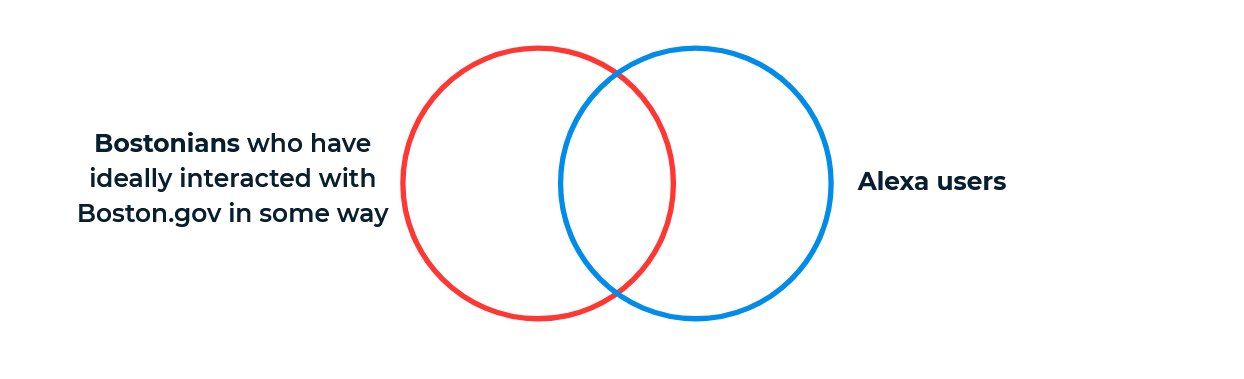
In order to most efficiently learn about our users, we investigated them by dividing them into two major buckets: Those who live and interact with the City of Boston, and those who own or interact with an Alexa device. Certainly our primary interest was in those who fit both descriptors, but learning about each separately was still easily extendable to our core user, while remaining feasible within our 3-week constraints.
“Boston Info” users are those who interact with the city of Boston, and also with their Amazon Alexa device.
Though we were not able to leave our homes to find people to research, we still had a number of techniques up our sleeves for reaching out to folks and finding the information we needed to know:
8 Personal Interviews
How do Bostonians interact with Boston.gov? How do Alexa users use Alexa? We sat down for 8 half-hour sessions to ask specific questions about real people’s experiences with the city or with their devices.
11 Surveys Taken
Our main focus was to identify which city service information was important to users. On a scale from ‘Very Important to Me’ to ‘Not Important to Me’, participants ranked the importance of current Boston Info skill abilities, and other city alerts found on the boston.gov homepage.
10 Short-form Reddit Responses
We asked the r/Alexa subreddit how they’re currently using their devices, helping us to collect examples of positive Alexa experiences.
Comparative Analysis of 7 Municipal Alexa Skills
We analyzed seven Alexa skills produced for different city and state governments. For each skill, we analyzed the skill’s abilities, its invocation (how the skill is opened), and what users hear when they open the skill. We also noted features common to many of them (like News and City Events), and which did these common things well or poorly.
Google Analytics
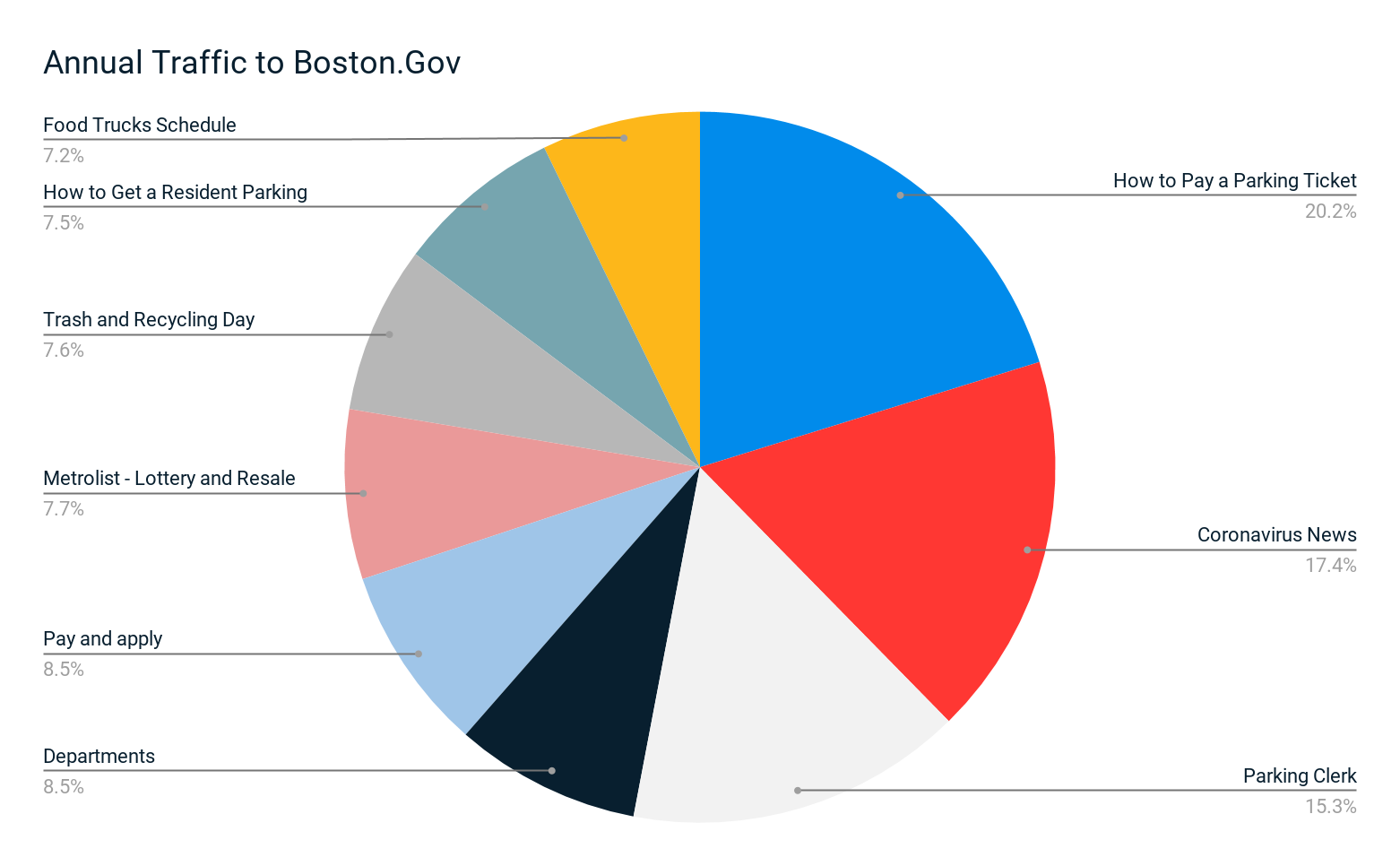
We dug into Boston.gov’s web traffic analytics for any insights or trends that may apply to the skill. We found that Coronavirus Information pages were visited much more than other pages, and ‘Trash & Recycling Schedule’ and ‘Food Trucks Schedule’, which were among the most trafficked pages, were already represented in the Skill.
Yearly traffic data from April 1, 2019 to March 31, 2020 - even though the captured data comes mostly from pre-Corona months, Coronavirus News is still the second most trafficked page.
Synthesis and Definition
Distilling what we’ve learned about our local users, and how other municipalities have approached similar problems, we defined our key problems to solve, and proposed solutions.
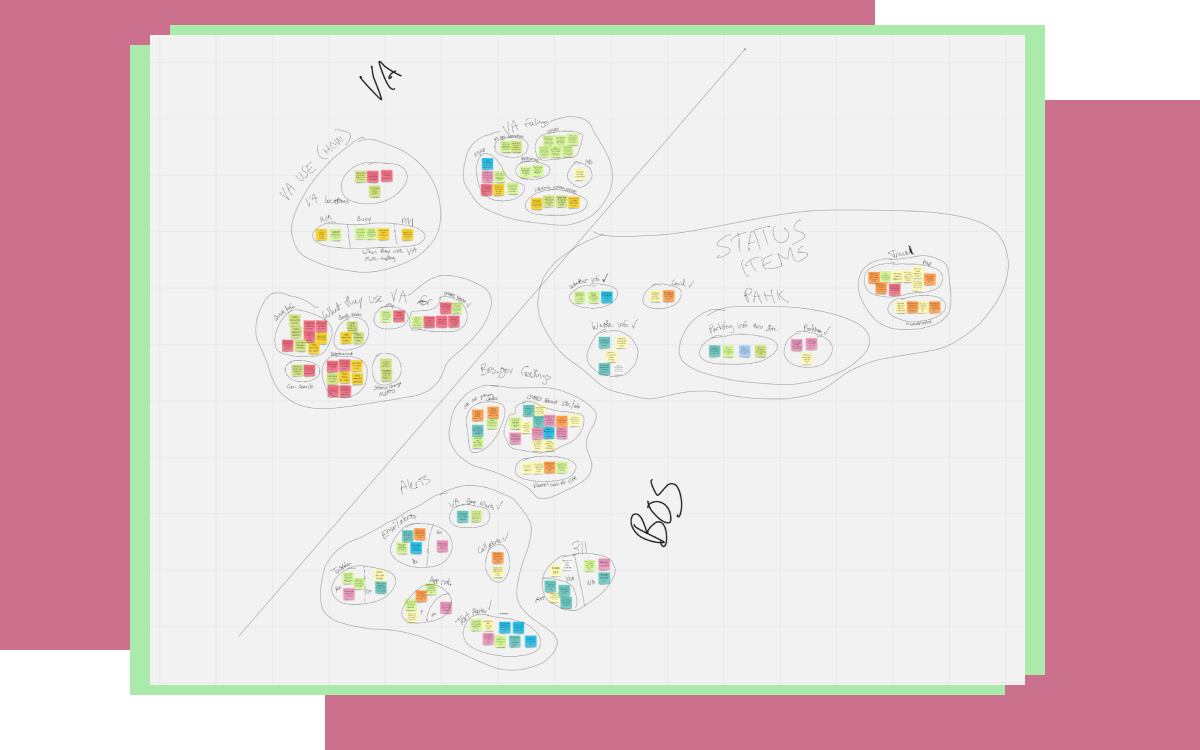
With the results of our user research in hand, it was time to set about organizing our thoughts and discovering the most salient problems that our Alexa Skill can solve. One common method for visualizing this qualitative data is to use an “Affinity Map” - a board of written notes, one insight per note, that can be physically rearranged and regrouped to bring common trends to the surface - think of it as panning for gold, sorting through individual notions to collect the larger clumps of common insights. To achieve this while working remotely, we used Miro to create the note board online.
Affinity Mapping - Putting all of our research insights onto virtual “sticky notes” and segmenting them into logical groups, to discover actionable trends and patterns.
Key Insights
Our research gave us a number of leads, and plenty of insights that we’d revisit throughout the process. Here are some of the most notable ones:
How do users interact with Boston.gov?
Their main tasks are to pay parking tickets, check snow emergency parking info, and lookup their trash and recycling day schedule (and to look up COVID-19 updates, in the current few months).
What city services, currently in the Skill or on Boston.gov, are important to you?
Very important or nice to know: Public Transit, Trash and Recycling, Locations & Times of Food Trucks & Farmers Markets, Snow Emergency Parking, City Construction, Parking Meters, and 311 Reports
No difference to me or not important: Tow Lot Info, Crime Reports, and City Building Hours
Travel inconveniences are very salient to users, though the MBTA often tracks these alerts themselves outside of boston.gov
How do people use Alexa?
They interact at home and are often in the middle of other tasks
Alexa interactions are quick, and often as the user is on the way out the door
Commonly used for coordinating smart home devices, asking one-off questions, or for simple entertainment
The Current Need
Alexa users in Boston need a way to get succinct info from the City of Boston because Bostonians care to stay informed about city services, and Alexa users are multitasking when engaging Alexa.
The Proposed Solution
We believe that by refining the current Alexa Skill to be more digestible, navigable, and specific, we will create a more convenient way for Bostonians to keep updated with the City.
We will know this to be true when we see measurable improvement using the System Usability Scale (SUS), and when we see a high sequence completion rate in Alexa’s Analytics.
Designing for Voice
Designing for a voice assistant with no visual interface was a novel challenge for us - we consulted with an industry expert, and took a unique approach to creating our first prototype.
At this point in the design process, the high-level analysis takes a pause, and pencil finally gets a chance to meet paper! This usually means drawing sketches of the interface, trying out button locations and navigation contents, and generally laying out where all the elements go. But with no visual interface to craft, how can we begin to design the product?
Conversational UX Design
We decided to seek some expert advice, and found it in Dr. Robert Moore, Lead Conversation Analyst and Researcher at IBM, who works on their own Watson-based voice assistant. Dr. Moore literally wrote the book about this very topic (entitled Conversational UX Design), and was gracious enough to sit down with us (remotely, of course), and discuss best practices, new horizons and challenges, and simply what this technology is best at accomplishing. Two major takeaways from our discussion with Dr. Moore were the ideas of Conversational Navigation, and Agent Persona:
Conversational Navigation
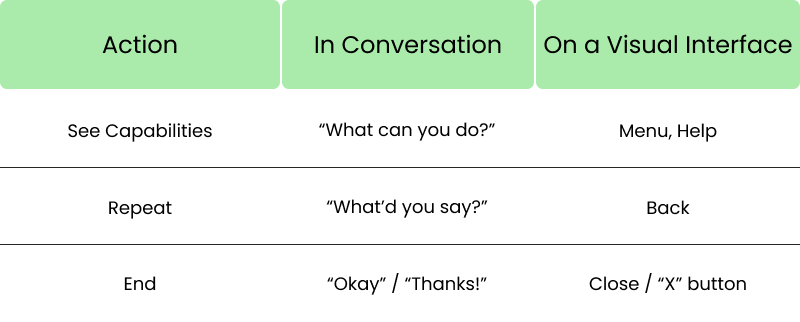
Many of the actions we need to take in an application or website have a related function in conversation. For instance, asking someone, “Could you repeat that?” is akin to going back to a previous page on a visual interface. Importantly, a conversation isn’t a monolog, even when only one person is supplying information: we supply information in digestible bits, and use feedback from the listener to adjust what we’re saying. Accounting for these kinds of feedback adds the interactivity that a typical app would implement with visible buttons and menus.
For each common need a user would have while interfacing with a visual application, there is an equivalent way to solve that need through conversation, whether with another person or with a voice assistant like Alexa.
Agent Persona
Because Alexa is “person-like”, we automatically tend to make certain assumptions about what she can do, based on what we’d expect a person in her position to know. Dr. Moore has a strategy for understanding what a user may logically expect the voice agent to be able to do, by creating a job description for her - an Agent Persona. By drafting the job description of a Boston Information Help Desk Assistant, for instance, we can better predict the sorts of questions users will naturally want to ask her.
Utterances and Expansion
Alexa interactions essentially boil down to two components: Utterances and Intents. Utterances are the words and phrases you say to Alexa, and the response she gives back to you. Intents are the functions or flows that are triggered by the user’s Utterance. For example, if I ask how tall Mount Everest is, that is an Utterance. Those words will trigger Alexa to run the “height-of-Mount-Everest” command, or Intent, which tells her to reply with the proper Utterance: “Mount Everest is 29,029 feet tall”.
This means that a large component of Alexa Skill design is content design. This is true not only for designing the responses that Alexa will give, and in collecting all the questions that can be asked, but also all the WAYS in which those questions can be asked (for instance, asking for the right “trash” day rather than the right “garbage” day). While Amazon has some ways to help with these sorts of phrasing issues, much of the work is still in the hands of the designer to predict and catalog the minutely different ways a question can be asked of Alexa.
Collecting all of these various versions of potential user questions would be exhausting if done manually - the skill currently has nearly 950 stored variations of the question “what’s my trash day” - but we can take a little of the sweat out of it by collecting them programmatically. Writing out each phrase with special syntax to indicate which words can be swapped with which is called “Utterance Expansion”, and plays a big part in making sure the Alexa device understands the way that anyone may ask the skill for information.
Our First Iteration
We could now combine the insights our user base taught us, with what we'd just learned about Conversational UX and all that we already knew about general design, to create our first iteration. This first draft would identify three particular issues that stood out as problems we could improve upon:
Unresolved inquiries
If Alexa didn’t understand or couldn’t accept your response, the conversation ended right there. That's a bit rude - we can give better navigational control by allowing the user another chance to give their response.
Unable to follow up or repeat
Most of the skill’s responses allow for no follow-up: the user asks a question, Alexa answers, and that’s the end of the interaction. We found places where useful follow-up questions could be asked, and answered. Also, simply asking Alexa to repeat the last thing she said was a feature that still needed to be implemented.
Long walls of text
Certain responses from Alexa went on for a very long time. This may partially be due to her slower-than-human cadence, or that many of her responses were written (not spoken) by their authors; whatever the cause, when a response goes on for too long, the user may forget key points they’ll need to respond, or simply be unwilling to wade through all that unskippable information to find the one nugget they need. We were able to segment many of those long responses into more digestible blocks, and develop strategies for writing further responses in a complete yet concise manner.
With our goals in mind and our team in agreement, we each took a full night to create our own versions of the utterances and intents the skill would offer. The next day, we critiqued and complimented, taking the best parts of each of our designs, and formed one combined prototype that we would be able to test.
Usability Testing
Testing a voice assistant already has its own varied constraints - adding quarantine measures on top of these, we needed to be creative to craft a meaningful way to test our prototype..
Just as we had to rediscover the first step to prototyping for a non-visual system, we needed to learn the first step to testing a non-visual prototype. Though Dr. Moore sympathized with the dilemma (one he faces as well), there are currently no established best practices for testing for voice, beyond writing a paper script to be read by the subject. We would be a bit on our own in developing a test that would suit our needs. No fear, though! This is just another design challenge! What are our needs and constraints?
Creating a Test
A proper test to fit our needs should be able to:
Capture Verbal Syntax, as opposed to written syntax. We speak differently than we write, and these differences would confound any results we could get from written responses.
Be consistent, in tone, timing, emphasis, etc. We humans are quite good at picking up meaning from little changes to inflection - making sure our "Test Alexa" is consistent across all trials will keep this from becoming noise in our results.
Be interacted with, just as a person would with a real Alexa device. If the user has follow-up questions to ask, the prototype needs to be able to respond as Alexa would. Users must also not be able to “read ahead” of Alexa’s responses, as would be possible with a written script.
These all need to be considered while under the following constraints:
We cannot meet in person, due to the COVID-19 quarantine.
We can’t use an actual Alexa, because our designs haven’t yet been turned into the code needed to run on the device.
This was a topic of many brainstorming sessions, over many days, even before we had anything yet to test. Finally, in a moment of inspiration, we struck upon the idea to create a soundboard.
The Soundboard
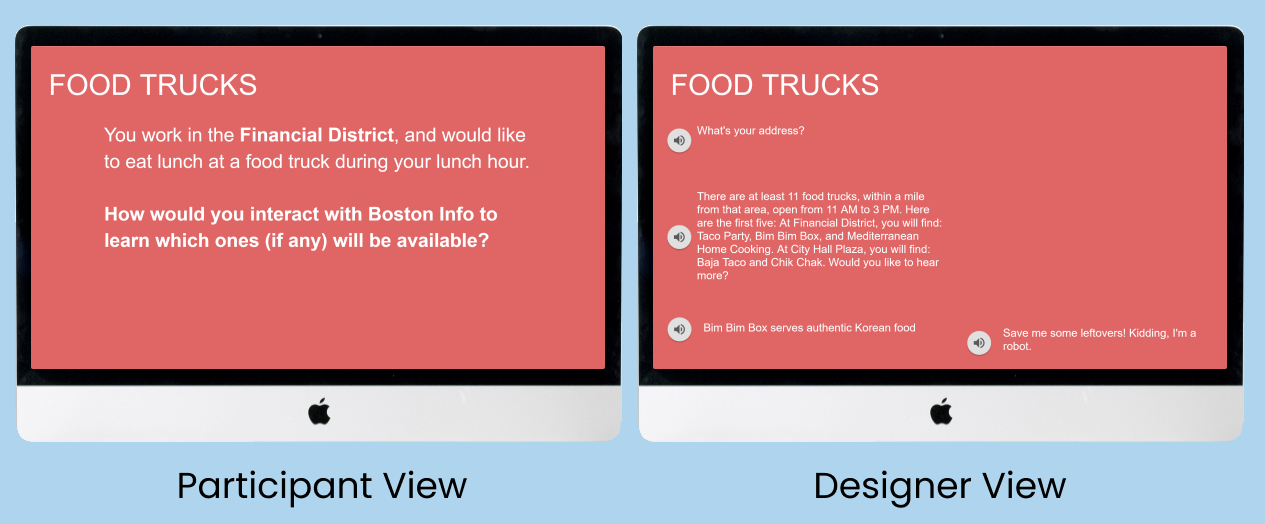
The test would run essentially like so: You, the test taker, would join a video call with one of us, the testers. We would share our screen, presenting one of two slideshows, this one just for the participants to see. On it, you’d see a prompt describing a little scenario you’re in, and be tasked to ask Alexa for some information you would need in such a scenario. You would ask her, in your own words.
Meanwhile, the tester would also have the second slideshow open. This one has the same number of slides, but each slide is composed entirely of links to audio files. These are the Alexa responses, pre-recorded using a text-to-speech tool with Alexa’s tonality, speaking the words we wrote and designed for the skill. When you ask Alexa a question, the tester clicks the appropriate response, and you will hear “Alexa” respond to your question. This continues back and forth for each scenario, all the while being recorded by another tester standing by, taking notes.
This mock-up shows the scenario the participant would see (left), while the designer has Alexa’s responses on-the-ready on his Soundboard view (right).
We were as robotic as we could be in searching for certain keywords/phrases to trigger which response (which Intent, that is) our users would be given, to approximate how Alexa would choose a proper Intent for a given Utterance.
SUS Score and Results
In order to help quantitatively measure the user’s impressions of our prototype, we employed the System Usability Scale, or SUS. This is a standardized 10-question survey given to a participant after our test, asking such questions as “I thought the system was easy to use” on a scale from Strongly Agree to Strongly Disagree. The scale results can be a little tricky to read - the average score is a 68, and anything above about an 80 is considered a very usable system.
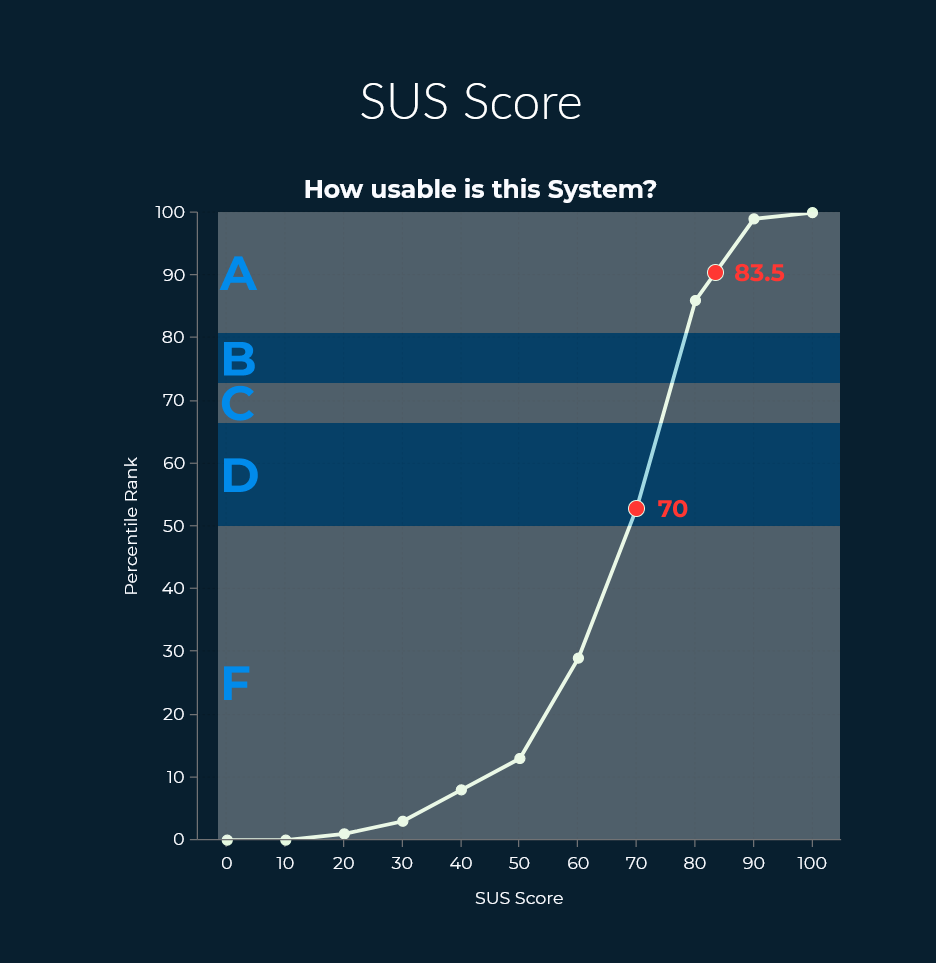
We ran our soundboard test 7 times on the initial version of the skill, plus 6 times on our first iteration on it and 4 times on our second iteration. You can see below that, though the initial version of the skill scored a respectable 70, there was a marked improvement with our final version’s score of 83.5. We do acknowledge that this score cannot fully factor in the experience of using the skill on an actual device, where Alexa’s processing of commands will be different than our own as human testers.
SUS scores, shown as a percentile rank: A score of 70 is more usable than about 55% of systems. A score of 83.5 is more usable than about 90% of systems.
We also collected a lot of qualitative data from our users’ experience. Some major points are listed here:
Highlights
Concise responses, such as for Trash Pickup, are simple and effective
The data behind the responses was often well received
Users were excited about being able to get COVID-19 updates
Considerations
Users expected more functionality around Public Transit
The phrase “City Service Alerts”, as used in the skill, is a bit confusing
Users were interested in being able to store an address for Alexa to remember
Conclusions and Reflections
Interest and expectations around certain features like Transit Alerts show promise for future iterations, even as our 3-week timeframe quickly came to a close.
As our project concluded, we needed to start dog-earing our notes and saying no to new additions. Our scope needed to be tight enough that we could deliver a finished design back to the City of Boston, but those extra ideas and insights were also passed along for future consideration. Some notable ones include:
Expanding Transit Alerts to be more specific may help keep it relevant, since many of our test users had high expectations for the feature.
Commonly found features from other municipal Alexa Skills, like Public Notices and Event Calendars, may be good ideas to consider.
Being able to see our work implemented so quickly, driven in part by such a clear and imperative need like disseminating COVID-19 updates, really showed us the kind of meaningfulness our work can have when we design for a community, with that community’s interests in the forefront of our mind. It’s been so rewarding to work for a group of people who care so much about the citizens their work supports, and we’re thankful to have been able to lend our help!